Agent use cases
Boring agent workflows are the real ones
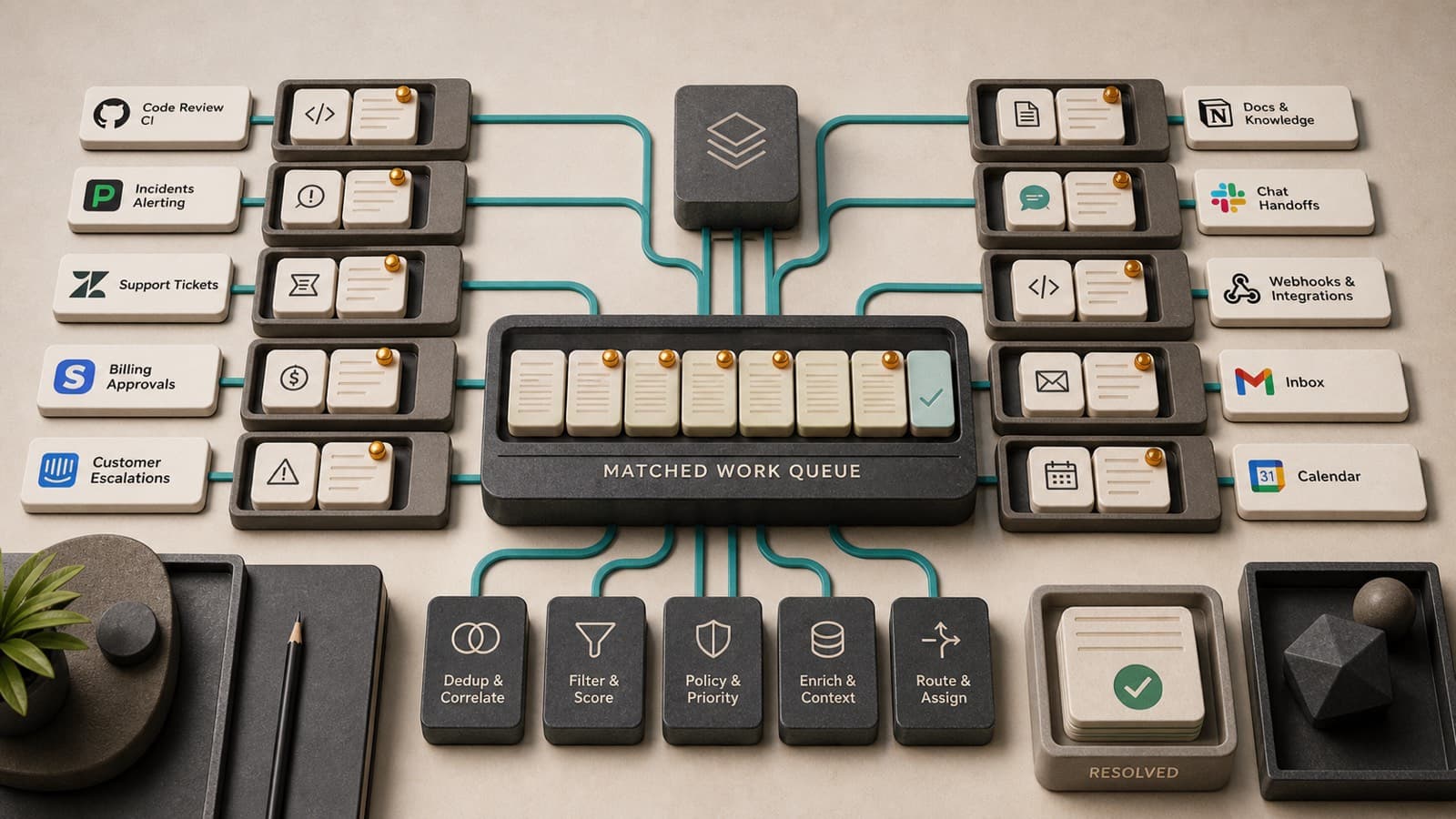
The best early proactive-agent workflows are boring on purpose. Inbox triage, calendar changes, ticket escalation, CI failures, billing anomalies, and customer handoffs have clear signals, obvious owners, and measurable outcomes. They are also where users already feel the cost of missing something.
Short answer
The best early proactive-agent workflows are boring on purpose. Inbox triage, calendar changes, ticket escalation, CI failures, billing anomalies, and customer handoffs have clear signals, obvious owners, and measurable outcomes. They are also where users already feel the cost of missing something.
Key takeaways
- Proactive agents do best when the wakeup condition is specific and the next action is bounded.
- "Boring" workflows have better evaluation data than broad life-assistant promises.
- The right starting point is not autonomy; it is reliable monitoring plus a useful handoff.
- Existing products in email, calendar, support, and DevOps already prove the demand for filtered attention.
- Watchline-style infrastructure helps these workflows by turning future conditions into matched deliveries.
The cinematic assistant is a trap
The flashy version of an AI assistant knows everything, predicts everything, and acts before the user asks. That story is fun, but it hides the hard part. Users do not want a mysterious assistant constantly making guesses about their life. They want specific things not to slip.
The practical version is quieter:
- tell me when an enterprise customer replies;
- wake the coding agent if this CI failure repeats;
- warn me if a calendar move breaks prep time;
- draft a response when a vendor sends the security questionnaire;
- route a support thread when it mentions a paid plan and downtime;
- flag a billing email that needs approval before Friday.
These workflows are not glamorous. They are where attention leaks out of the day.
Existing products point the way
The market already pays for filtered attention. Superhuman sells AI-powered email workflows around triage, drafting, and fast response: https://superhuman.com/products/mail/ai. Microsoft Copilot features summarize and act across work communications: https://support.microsoft.com/en-us/copilot. Calendar tools such as Clockwise and Reclaim optimize time and scheduling constraints: https://www.getclockwise.com/ and https://reclaim.ai/.
In support and operations, PagerDuty, Zendesk, GitHub, Linear, and Slack all orbit the same need: route important change to the right human or system quickly. GitHub's webhook docs are a reminder that developer workflows have long been event-driven: https://docs.github.com/en/webhooks.
The agent shift is not that these needs appeared from nowhere. It is that agents can now do more after the wakeup: summarize context, prepare a draft, inspect a repo, create a ticket, or ask for approval.
Good workflows have narrow wakeups
A broad instruction like "watch my inbox for anything important" is hard to evaluate and easy to dislike. A narrow instruction like "wake me when a customer with an open P0 escalation replies to a thread where I am directly addressed" is better.
Narrow wakeups have four advantages.
First, they are easier to test. You can label events, measure true positives and false positives, and improve the matcher.
Second, they are easier to explain. The system can show why it woke up.
Third, they are safer. The permission envelope can be scoped to the event and workflow.
Fourth, they are easier to sell internally. Teams understand the cost of missed escalations, missed meetings, missed CI failures, and missed approvals.
The handoff matters more than the hero action
Many agent demos jump from wakeup to completed action. In real organizations, the durable value is often the handoff.
For a support escalation, a good handoff might include customer, plan, thread summary, sentiment, related incidents, SLA clock, and suggested owner. For a CI failure, it might include branch, commit, test name, recent flaky history, and linked issue. For a calendar conflict, it might include old time, new time, attendees, travel constraints, and prep material.
The agent does not need unlimited autonomy to be useful. It needs to put the right packet of context in front of the right worker at the right time.
That is why event-layer infrastructure matters. It turns "maybe something happened somewhere" into "this watch matched, here is the evidence, here is the next bounded step."
Boring workflows make better benchmarks
Benchmarks get cleaner when the workflow is concrete. Email watchers can be evaluated against labeled message streams. Calendar watchers can be evaluated against schedule deltas. CI watchers can be evaluated against build events and issue outcomes. Support watchers can be evaluated against routing and response windows.
This matters because proactive-agent quality is not only answer quality. It includes missed wakeups, false wakeups, latency, token cost, and recovery from delivery failures.
Research benchmarks such as ProAgentBench and PROEVENT show the same broad direction: timing and intervention quality matter, not just final response quality: https://arxiv.org/abs/2602.04482 and https://openreview.net/forum?id=wypdOy0HrM.
A good first workflow
If you are building with proactive agents, start with one workflow that has:
- a named owner;
- a clear source stream;
- a specific future condition;
- labeled historical examples;
- a bounded next action;
- a visible way for users to correct false matches.
That might sound smaller than "personal AI chief of staff." Good. Smaller workflows are how trust compounds.
FAQ
Why call these workflows boring?
Because they are not speculative. They already happen every day in inboxes, calendars, ticket queues, CI systems, billing threads, and support desks. That is what makes them valuable.
Should proactive agents avoid creative work?
No. Creative work can be a great downstream action. The wakeup itself should still be grounded in a specific signal so the assistant does not interrupt the user with vague guesses.
What is the easiest workflow to start with?
Start where the source stream is structured and the cost of missing an event is obvious: customer escalations, CI failures, meeting changes, approval deadlines, or high-priority inbox replies.